Best Live IPTV in the UK (2026): Services, Sports Streams, Formats & Players
What live IPTV is (simple explanation)
Live IPTV is simply a way of watching real-time TV channels over your internet connection instead of through an aerial, satellite dish, or cable box. In practice, it means you open an app on a Smart TV, streaming stick, phone, or tablet and watch live channels in the same “right now” format as traditional TV. The key difference is the delivery method: IPTV uses your broadband to send the channel stream to your device, which is why your viewing experience depends heavily on both the service quality and your home network.
For most UK viewers, the easiest way to understand IPTV is to compare it to Freeview and Freesat. Freeview uses an aerial, Freesat uses a satellite dish, and IPTV uses your router. If your internet is stable, IPTV can feel just as smooth as traditional TV — but it can also be more flexible. For example, many IPTV streaming services support multiple devices, offer channel lists that update more frequently, and let you watch in different rooms without installing extra hardware. This is why many people researching the best live iptv are usually trying to solve a practical problem: “How do I get reliable live TV and sports without paying for a full satellite package?”
It’s also important to separate “live IPTV” from on-demand streaming like Now TV series, Netflix, or ITVX. On-demand apps play pre-stored video, so buffering is usually minimal and quality is more consistent. Live TV IPTV stream content is happening in real time, which means your stream has to stay stable continuously — especially during busy hours like football matches or boxing nights. This is also why people searching for an iptv boxing stream often complain about sudden buffering, low quality, or streams dropping right before the main event. In those moments, the best way to stream iptv isn’t about fancy features — it’s about stability, a good stream format, and a player that can recover quickly if the connection dips.
A simple rule of thumb: IPTV is worth considering if you want live channels on modern devices and you’re comfortable using apps, but you should treat it like any other streaming setup — quality depends on the provider, the app, and your broadband. If you’re comparing options, check three things before paying: device support (Smart TV, Firestick, Android TV, mobile), whether the service includes a proper channel guide (EPG), and whether it stays stable during peak sports hours. If you already have a strong broadband connection, IPTV can be a clean alternative to traditional setups; if your Wi-Fi is weak or your household streams a lot at once, you’ll want to optimise your network first.
Quick takeaway:
- IPTV = live TV delivered through your internet connection, using apps on modern devices.
- Live streams are harder to keep stable than on-demand content, especially during sports.
- Reliability depends on the service, the stream format, and your home network.
IPTV vs Freeview / Freesat / Sky / Now TV
IPTV, Freeview, Freesat, Sky, and Now TV all solve the same basic need — watching TV in the UK — but they do it in completely different ways, and the “best” option depends on what you care about most: price, simplicity, live sports, or flexibility. Freeview is the most straightforward: you plug an aerial into your TV (or use a Freeview Play box) and get free UK channels with no monthly subscription. Freesat works similarly but uses a satellite dish instead, which can be a better choice in areas where aerial reception is weak. Both are excellent if you mainly watch BBC, ITV, Channel 4, Channel 5 dramas, and general entertainment.
Sky is the premium traditional option. It’s designed for people who want a polished, all-in-one experience: a full channel bundle, strong sports coverage, and a familiar TV guide. The downside is cost and commitment, and you’re often paying for channels you never watch. In 2026, Sky Stream has made things simpler because you don’t need a dish — it runs through broadband — but it’s still a subscription-first ecosystem. If you like the Sky interface and want reliable live sports without messing around, it’s still one of the most predictable choices.
Now TV sits somewhere in the middle. It’s not a full replacement for Freeview or Sky, but it’s a flexible alternative to Sky TV because you can buy passes month-by-month, especially for sports and entertainment. The catch is that costs can stack up quickly, and you’re still working within a defined catalogue. If your main goal is live sport without a long contract, Now TV is often the most “normal” solution, especially for viewers who don’t want to think about stream formats, players, or device compatibility.
IPTV is different because it isn’t one single brand or system — it’s a method. IPTV streaming services deliver live TV through apps, and the experience can range from extremely smooth to extremely frustrating depending on the provider and your setup. IPTV can be appealing if you want more flexibility across devices (Smart TV, Firestick, mobile) and you like the idea of one subscription for live channels. But it’s also the option where you need to be most careful, because quality, legality, and reliability vary wildly. If you’re comparing, a quick decision rule is: choose Freeview or Freesat for free mainstream UK TV, choose Sky or Now TV for the cleanest paid experience, and consider IPTV only if you’re confident you can evaluate services properly and you want a broader live TV IPTV stream setup.
Mini comparison (UK viewer perspective):
| Option | Best for | Main downside |
|---|---|---|
| Freeview | Free UK channels, simplicity | Reception depends on aerial |
| Freesat | Free UK channels, weak aerial areas | Needs a dish |
| Sky / Sky Stream | Premium TV + sports | Cost, bundles |
| Now TV | Flexible sports/entertainment passes | Can get expensive |
| IPTV | Multi-device live TV flexibility | Quality varies, requires research |
Quick takeaway:
- Freeview/Freesat = best for free UK TV with minimal hassle.
- Sky/Now TV = best for a polished paid experience, especially sports.
- IPTV = best only if you prioritise flexibility and can judge service quality.
IPTV live streaming vs on-demand streaming
IPTV live streaming and on-demand streaming both use the internet, but they behave very differently in real life. Live IPTV is a continuous stream of a channel happening right now, like watching BBC One or a sports channel at the exact same time as everyone else. On-demand streaming is when you choose a programme and press play from a library, like Now TV series, ITVX, Netflix, or Channel 5 catch-up. The difference matters because live TV has far less room for error: if your connection dips for even a few seconds, you notice it immediately.
The reason on-demand feels “smoother” is simple. On-demand platforms can buffer ahead, adjust quality gradually, and even pre-load parts of a show before you press play. That’s why a drama episode can look perfect even on average Wi-Fi. IPTV live streaming doesn’t get that luxury, especially during busy moments like Saturday football, a big boxing card, or a popular live event. This is where many people run into trouble when searching for an iptv boxing stream — not because the internet is “bad”, but because live streams are far more sensitive to congestion, unstable Wi-Fi, and overloaded servers.
Another practical difference is how you watch. On-demand streaming is usually built into the official app ecosystem on Smart TVs, Apple TV, Firestick, and phones, with consistent menus, profiles, subtitles, and reliable playback. IPTV setups can vary: some services have polished apps, while others rely on a separate player, playlists, or a live TV IPTV stream interface that feels less refined. That doesn’t automatically mean IPTV is worse, but it does mean you should expect a more “setup-based” experience. If you want a living-room solution that feels like Sky, on-demand apps and official services are still the easiest path.
A good decision rule is to choose on-demand first if your main goal is entertainment and box sets, and choose live IPTV only if you genuinely need live channels, live sports, or a channel-style experience. If you’re deciding between options, test your home setup before paying for anything: watch a live event on a mainstream app, check if your TV or streaming stick handles it smoothly, and if possible use Ethernet instead of Wi-Fi. The best iptv streaming service won’t feel premium if your network is unstable, while even a basic on-demand app will usually perform well on the same connection.
Mini comparison (how it feels at home):
| Type | Best for | Typical issues |
|---|---|---|
| Live IPTV | Live TV channels, sports, real-time events | Buffering, delays, stream drops |
| On-demand streaming | Series, films, catch-up | Rare buffering, limited “live” channels |
Quick takeaway:
- On-demand is usually smoother because it can buffer ahead.
- Live IPTV is more fragile during sports and peak-time viewing.
- Your device and home network matter more for live streaming than most people expect.
Best IPTV streaming service: what actually matters
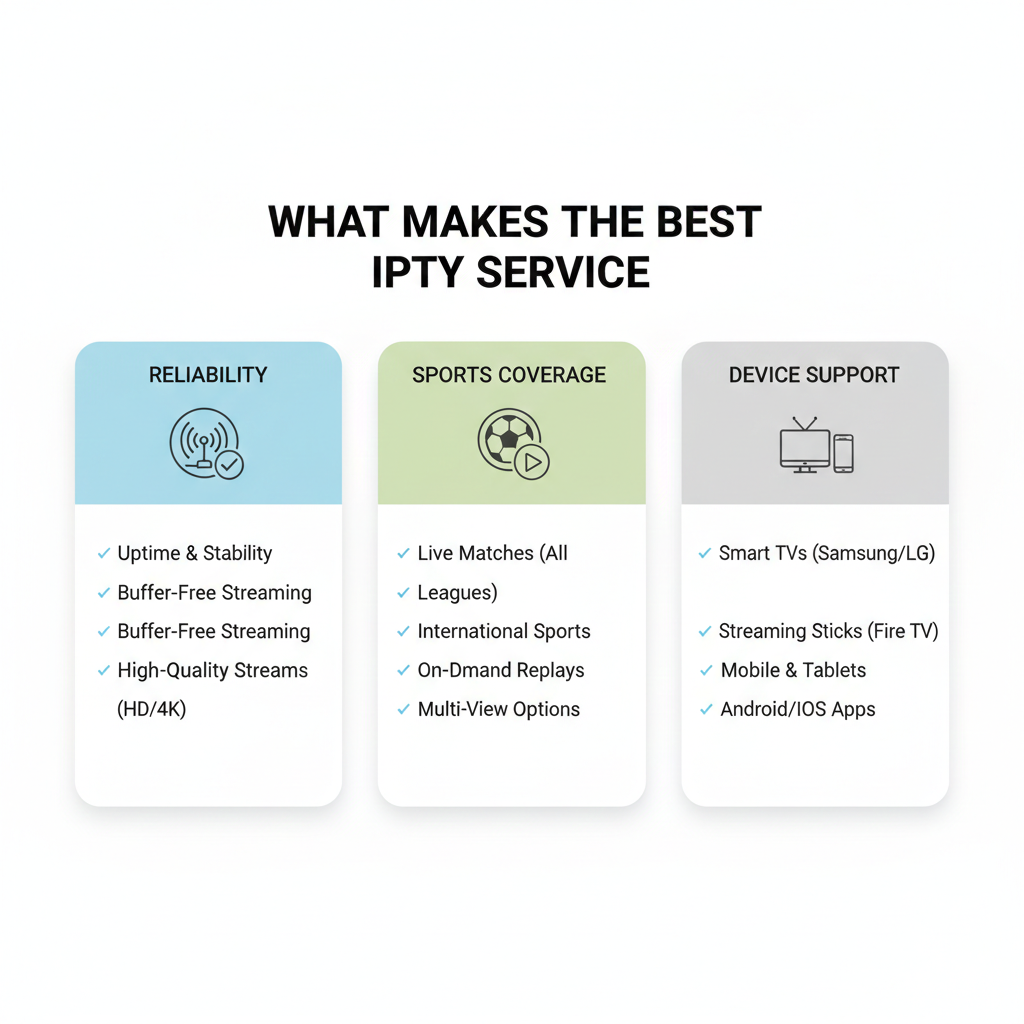
The best IPTV streaming service isn’t the one with the biggest channel list — it’s the one that stays stable when you actually need it, works smoothly on your devices, and gives you a viewing experience that feels like proper TV. Most people don’t realise this until they’ve tried a service that looks great on paper but becomes unusable during peak hours. If you’re watching live sport, reliability matters more than anything else, because a stream that buffers during a big moment is worse than not having the channel at all.
Reliability is the first thing to judge, and it’s also the hardest to verify from a sales page. A strong service should handle busy times without constant buffering, offer multiple stable stream sources, and recover quickly if a connection dips. This is where the stream format matters too: many UK viewers get better results with HLS streams because they’re designed to adapt to changing internet speeds. If a provider only offers one fragile stream type, you’re more likely to see freezing or sudden quality drops. This is also why “best live iptv daily updates” is a common search — people aren’t looking for news, they’re looking for a service that doesn’t feel abandoned or broken.
The second factor is sports coverage and how it performs in real use. Anyone can claim they offer sport, but the real test is whether the streams stay stable during big events like football weekends or boxing nights. If you’re specifically looking for an iptv boxing stream, you should be extra strict: check whether the service supports HD consistently, whether it has a proper EPG schedule so you can find events quickly, and whether it works on your preferred device without hacks. In 2026, most viewers are watching on Fire TV, Android TV, Smart TVs, or mobile — so the best way to stream iptv is the way that fits your daily routine, not the most complicated setup.
The third factor is usability and support. A premium service should be easy to log into, easy to navigate, and compatible with a solid player if you prefer using one. Many people underestimate how important the best media player watching live iptv streaming can be — a good player can make an average stream feel stable, while a bad player can make a good stream feel unreliable. Finally, look at practical service basics: clear pricing, a trial option, and support that answers real questions instead of copy-paste messages. If a provider pushes “bulletproof streams iptv” marketing or promises “all channels forever,” treat it as a warning sign, not a benefit.
Mini checklist (what actually matters):
- Stable streams at peak time (sports evenings, weekends)
- Stream format options (HLS is often safest for UK broadband)
- Device support (Firestick, Android TV, Smart TV, mobile)
- Usable EPG + simple navigation
- Trial, clear pricing, real customer support
Quick takeaway:
- Reliability beats channel count every time.
- Sports streaming quality is the real stress test.
- Your player and device matter as much as the provider.
Reliability (buffering, peak-time performance, daily updates)
Reliability is the difference between IPTV that feels like normal TV and IPTV that feels like a constant fight with buffering. If you’re choosing between IPTV streaming services, this is the factor that should carry the most weight, because everything else becomes irrelevant when streams freeze during the exact moment you wanted to watch. In the UK, reliability is tested hardest at peak times: football evenings, big boxing cards, and weekend prime-time viewing, when thousands of people are trying to stream the same channels at once.
Buffering usually happens for one of three reasons: the provider’s servers can’t handle demand, your home network is unstable, or your device/player struggles to keep up. The tricky part is that these problems can look identical on screen. A stream might freeze, drop to low quality, or restart, and you won’t know if the service is overloaded or if your Wi-Fi is the weak link. That’s why “best live iptv daily updates” is such a common search phrase — people aren’t chasing news, they’re trying to avoid services that quietly break, lose channels, or stop working after a few weeks.
Peak-time performance is the real stress test, especially for sports. If you’re using IPTV for live sport, you should assume Saturday evenings and fight nights will be the hardest conditions. A service that performs perfectly at 11am on a Tuesday can still collapse when demand spikes. This is where stream delivery matters: many viewers find HLS more stable for live TV IPTV stream viewing because it adapts better to changing broadband speeds. If a provider offers multiple stream sources per channel, that’s often a sign they’ve built reliability into the service rather than hoping one stream will hold.
Daily updates matter for a different reason: IPTV channel lists, guides (EPG), and stream links change constantly. Even legitimate services need to maintain schedules, fix broken channels, and keep apps compatible with current devices like Fire TV, Android TV, and Smart TVs. When a provider updates regularly, it usually means two things: they’re actively maintaining the platform, and they have support workflows in place when things go wrong. Before subscribing, look for practical signals: clear maintenance notices, a working status page or support chat, and trial access so you can test performance at the exact times you plan to watch.
Quick takeaway:
- Test IPTV at peak times, not during quiet hours.
- Buffering can be the provider, your Wi-Fi, or the player — and it’s hard to tell without testing.
- Regular updates often signal active maintenance and better long-term stability.
Sports coverage (UK live sports + boxing streams)
Sports coverage is where IPTV services either shine or completely fall apart. Plenty of providers claim they have “all sports,” but what matters to UK viewers is whether the channels you actually want are available, easy to find, and stable when the match or fight starts. If your goal is UK live sports, you’re usually looking for a predictable mix: football, boxing, UFC, motorsport, and mainstream sports channels — and you want them in a format that works on your main device without constant workarounds.
The first thing to understand is that sports streaming is the hardest category to deliver reliably. Sports events happen at fixed times, and demand spikes instantly. That’s why people searching for best iptv for uk live sports often care less about the number of channels and more about whether streams hold up during peak-time. A service can be fine for general entertainment and still collapse when a Premier League match kicks off. In practical terms, you want a provider that offers multiple stream sources for major sports channels, a working EPG schedule, and fast channel switching so you’re not stuck buffering while trying to find the right feed.
Boxing is an even more specific test. Anyone who has tried an iptv boxing stream knows the pattern: the undercard streams fine, then the main event starts and everything becomes unstable. If you watch boxing regularly, check whether the service offers consistent HD quality, whether the streams stay stable late into the night, and whether there’s a backup option if the main feed fails. It also helps if the service is compatible with a strong player on Fire TV or Android TV, because good playback software can reduce stuttering and recover faster after a brief connection drop.
A smart way to judge sports coverage is to test it like a real viewer, not like a shopper. Look at how sports channels are organised (are they buried, duplicated, or clearly labelled?), check whether schedules match UK times, and test the exact time you’d normally watch. If you’re comparing IPTV streaming services, ask yourself one simple question: “Will I trust this on fight night?” If the answer is no, it’s not worth paying for, no matter how impressive the channel list looks.
Quick takeaway:
- Sports is the hardest content for IPTV to deliver consistently.
- Boxing streams are the most brutal reliability test.
- A good EPG and fast channel switching matter more than people expect.
Devices (Smart TV, Firestick, Android TV, mobile)
Devices matter more than most people realise because IPTV isn’t just about the service — it’s about how well your hardware and apps can handle live streaming. Two people can use the same subscription and have completely different experiences simply because one is watching on a modern streaming stick with a strong player, while the other is using an older Smart TV app that struggles with live streams. If you want a setup that feels stable and “normal,” your device choice is one of the fastest ways to improve results.
Smart TVs are the most convenient option because everything is built in, but they’re also the most inconsistent. Some TV brands have excellent app support, while others have limited stores, outdated software, or weak performance after a few years. IPTV apps on Smart TVs can work well for general channels, but live sport is where problems show up first: slower channel switching, freezing, and crashes when streams are under pressure. If you only want casual viewing, Smart TV is fine; if you want reliable sports, a dedicated streaming device often performs better.
Firestick and Android TV boxes are the most common “upgrade path” for UK viewers because they’re affordable, fast, and flexible. In 2026, Fire TV is especially popular because it’s easy to set up and works well with most IPTV players. Android TV is similar, but offers more choice in apps and can feel smoother for certain players and formats. If your main goal is a stable live TV IPTV stream experience, these devices often give you better playback, faster navigation, and fewer compatibility surprises than built-in Smart TV apps.
Mobile viewing (phones and tablets) is great for flexibility — watching in bed, travelling, or checking a match while you’re out — but it’s not always the best test of service quality. Mobile networks can hide buffering by dropping quality aggressively, and small screens make lower bitrate streams look “fine” even when they’d look poor on a 55-inch TV. If you’re judging a provider, test on the device you actually care about most. Also, if you plan to watch sports regularly, consider pairing your device with a strong IPTV player, because the best media player watching live iptv streaming can make a noticeable difference in stability and ease of use.
Quick takeaway:
- Smart TVs are convenient but often the least reliable for live sports.
- Firestick and Android TV are usually the best balance of stability and simplicity.
- Always test IPTV on the device you’ll actually watch on most.
IPTV boxing stream: how to watch without unreliable streams
If you want a reliable IPTV boxing stream, the biggest mistake is assuming “boxing” is just another channel category. Boxing nights are the ultimate stress test for streaming because demand spikes instantly, streams get overloaded, and even small connection problems become obvious. The result is the classic scenario: everything looks fine during the undercard, then the main event starts and the stream freezes, drops quality, or disappears. The goal isn’t just to find a service that claims it has boxing — it’s to build a setup that stays stable when the pressure hits.
The most practical way to avoid unreliable streams is to treat fight night like an event, not casual viewing. First, test your service during peak hours before you ever pay for a big night. If the provider struggles on a Saturday evening, it will struggle even more during a major fight. Second, check how quickly you can access the correct feed. A working EPG and clear channel naming matter a lot when you’re trying to find the right broadcast five minutes before the ring walk. If you’re using IPTV streaming services that have messy lists, duplicated channels, or unclear labels, you’re far more likely to miss the start or end up on a broken stream.
Your device and player choice also matter more for boxing than most people expect. In 2026, most UK viewers get the most consistent results on Fire TV or Android TV because they handle live playback better than many Smart TV apps. Pairing that device with the best media player watching live iptv streaming can reduce buffering, improve stream recovery after brief drops, and make channel switching faster. This doesn’t magically fix a bad provider, but it can make a good service feel much more stable — especially when you’re switching between multiple feeds or trying to restart quickly.
Finally, keep your expectations realistic. Boxing is one of the most commonly targeted categories by low-quality providers because they know demand is high. Be wary of services that promise “bulletproof” performance or “every PPV” without clear details. If you want the smoothest experience, prioritise reliability over channel count, use Ethernet if possible, and keep a backup option ready (even if it’s a legitimate on-demand sports service). When people ask for the best iptv for uk live sports, what they’re usually describing is not a channel list — it’s peace of mind during big events.
Quick takeaway:
- Boxing nights expose weak IPTV services instantly.
- A clear EPG, fast channel switching, and a strong device matter a lot.
- Test at peak time before trusting a provider on fight night.
What to check before fight night
The best way to avoid a disappointing fight night is to do a quick, practical check before the event starts — not when the ring walk is already happening. Boxing streams fail most often because people assume their setup will behave the same way it does on a quiet weekday. In reality, fight nights are peak-time streaming at its most demanding, so you want to confirm your provider, device, and network can handle pressure before the biggest moment.
Start with the service itself. Check that the sports channels you need are actually working on the same day, not just “available” in the channel list. Open the relevant sports section, confirm the channel loads quickly, and make sure the stream holds for at least 5–10 minutes without quality drops. If your service offers multiple stream sources, test at least two. This small step alone can save you from the most common problem: a channel that looks fine but collapses the moment thousands of viewers tune in.
Next, check your device and player setup. If you’re watching on a Smart TV app, confirm it can handle fast channel switching without freezing. If you’re using Fire TV or Android TV, restart the device before the event and close background apps so your player has maximum memory. Also confirm your player settings are sensible: if it has a “buffer size” option, a slightly larger buffer often helps live sport. This is also where many people get better results by using the best media player watching live iptv streaming rather than relying on a weak built-in app.
Finally, check your home network like you’re preparing for a live broadcast, not casual viewing. If possible, use Ethernet instead of Wi-Fi. If you can’t, make sure you’re on the strongest band (usually 5GHz in the same room) and minimise other heavy usage during the event. A simple real-world example: if someone starts a 4K Netflix film in another room, your live TV IPTV stream may suddenly start buffering. If you’re serious about boxing, treat the stream like it’s the main priority for the evening.
Fight night checklist (fast and realistic):
- Test the correct sports channels 1–2 hours before the event
- Confirm the EPG schedule and channel naming makes sense
- Restart your streaming device and close unused apps
- Use Ethernet if possible, or strong 5GHz Wi-Fi
- Keep a backup stream source ready inside your service
Quick takeaway:
- The biggest mistakes happen in the last 10 minutes before the main event.
- Testing channels early is more important than choosing the biggest channel list.
- Your device and network matter as much as the IPTV provider.
The biggest reasons streams fail (and how to avoid them)
Most IPTV streams don’t fail because the viewer did something “wrong” — they fail because live streaming is fragile under pressure. The most common pattern is simple: the stream works perfectly during quiet hours, then starts buffering, freezing, or dropping out when a major sports event begins. That’s why people searching for best iptv for uk live sports often end up frustrated. The truth is that reliability is a chain, and the chain breaks at its weakest link: the provider, the stream format, the player, the device, or your home network.
The first big reason streams fail is provider overload. When thousands of viewers hit the same channel at once, low-quality providers run out of capacity and streams start collapsing. This usually shows up as endless buffering, sudden quality drops, or streams that restart every few minutes. You can’t fix this with settings — the only real solution is choosing IPTV streaming services that handle peak-time demand and offer multiple stream sources. If you see the same problem every time there’s a big match or fight, it’s almost always the provider, not your broadband.
The second reason is your home network, especially Wi-Fi. Many UK households have decent broadband but poor wireless coverage, and live TV IPTV stream playback is far less forgiving than on-demand apps. A single weak spot in the house, a busy router, or another device streaming 4K content can cause stuttering and freezes. The fix is usually practical: use Ethernet if possible, move your streaming stick closer to the router, switch to 5GHz Wi-Fi, or reduce competing traffic during the event. For people who watch sport regularly, upgrading the router often makes a bigger difference than changing the subscription.
The third reason is the device and player combination. Some Smart TV apps struggle with live streams, especially when channel switching is fast or streams are delivered in less forgiving formats. A Fire TV or Android TV device paired with the best media player watching live iptv streaming can improve stability, reduce crashes, and recover faster after brief drops. Also, many viewers don’t realise that stream format matters: HLS is often more stable for typical UK broadband, while some other formats can look sharper but fail more easily when the connection fluctuates. If your stream fails randomly even when your internet is fine, switching the player or stream source is one of the fastest tests you can do.
Quick takeaway:
- If it fails only during big events, it’s usually provider overload.
- If it fails randomly, Wi-Fi or your device is often the culprit.
- Player choice and stream format can make a big difference.
What is the best stream format for IPTV?
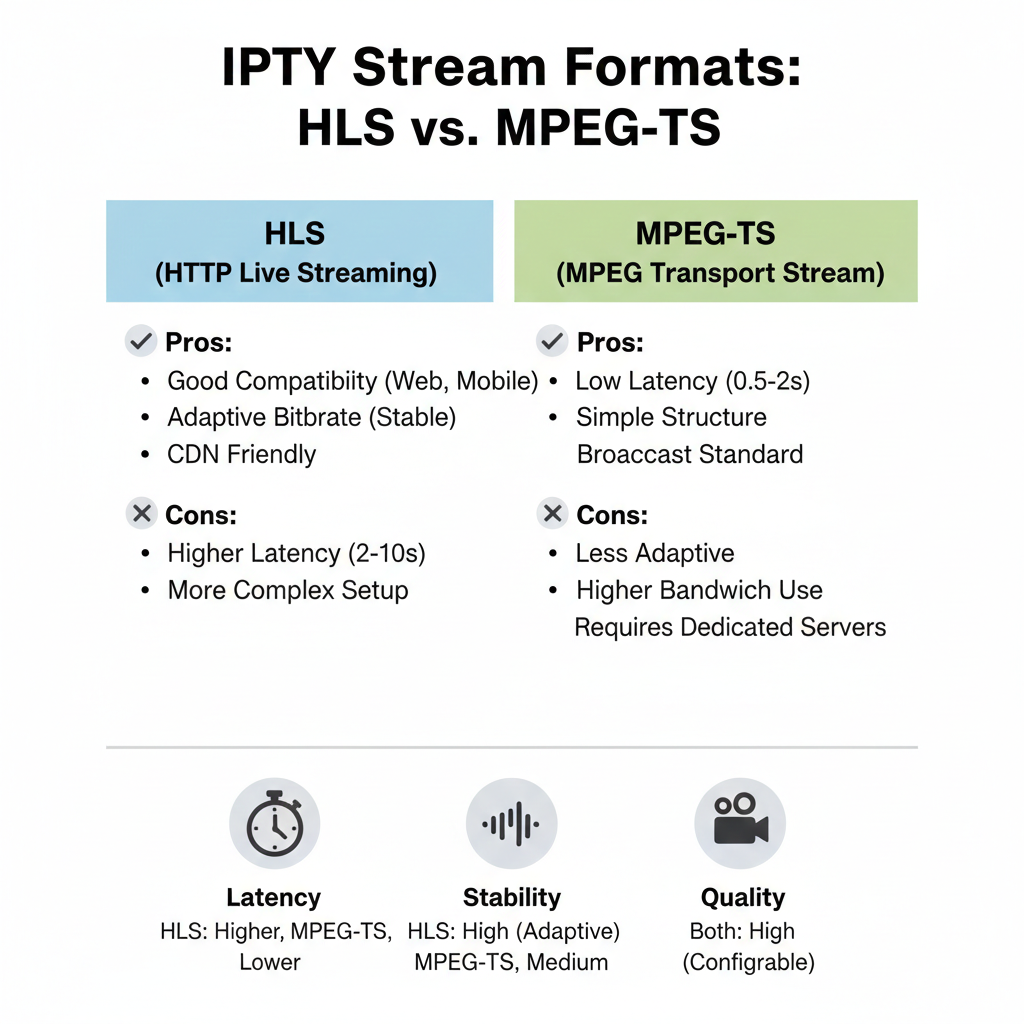
The best stream format for IPTV is usually HLS for most UK viewers, because it’s designed to stay stable when your internet speed changes. While some formats can deliver slightly lower delay or sharper quality, HLS tends to handle real-world home broadband better, especially on Wi-Fi and during peak-time sports. If your goal is smooth live TV IPTV stream viewing rather than chasing the lowest latency, HLS is often the safest default choice.
The reason stream format matters is that IPTV isn’t just “a video.” It’s a live broadcast being delivered through your internet connection in a specific technical wrapper. Different wrappers behave differently when the connection fluctuates, when the device is under load, or when the provider’s servers are busy. HLS works by breaking the stream into small segments and letting the player adjust quality dynamically. That’s why it’s widely supported across Smart TVs, Firestick, Android TV, and mobile devices, and why it’s often the most forgiving format when you’re watching live sport.
The other common format you’ll see is MPEG-TS. It’s older, but still widely used for IPTV because it can feel more “direct” and sometimes has lower delay. The trade-off is that it’s less tolerant of network instability. If your broadband drops briefly or your Wi-Fi stutters, MPEG-TS is more likely to freeze hard, while HLS often keeps going by lowering quality temporarily. This is why many viewers who search what is the best stream format for iptv are really describing a buffering problem, not a quality problem. For most households, a stable stream at 1080p is more enjoyable than a “sharper” stream that collapses every few minutes.
A practical way to choose is to match the format to your viewing style. If you mainly watch entertainment channels casually, either format may work fine. If you watch sports, boxing, or anything where buffering ruins the moment, HLS is usually the better choice — especially if your setup is on Wi-Fi or you share broadband with other people. If your provider offers both formats, test them during a busy time and see which one stays stable on your device and player. The best iptv streaming service will often give you multiple stream options so you can choose stability over delay, depending on what you’re watching.
Mini comparison (what most viewers notice):
| Format | Best for | Common downside |
|---|---|---|
| HLS | Stability, broad device support | Slightly higher delay |
| MPEG-TS | Lower delay, direct feel | More freezing on unstable Wi-Fi |
Quick takeaway:
- HLS is usually the safest choice for UK broadband and Wi-Fi.
- MPEG-TS can be faster but is less forgiving when your connection dips.
- Always test formats during peak-time, not quiet hours.
HLS vs MPEG-TS (which is best for live sports)
For live sports, HLS is usually the better choice for most UK viewers because it prioritises stability over everything else. When you’re watching football, boxing, or any high-demand event, the biggest enemy isn’t a few seconds of delay — it’s buffering, freezing, or a stream dropping at the worst moment. HLS is built to handle real-world broadband conditions, which is why it often performs better on home Wi-Fi and shared networks. MPEG-TS can feel faster, but it’s also more likely to fall apart when the connection isn’t perfectly stable.
The main difference is how the stream is delivered. HLS breaks the live broadcast into small segments and lets your device adjust quality automatically. If your internet speed dips, the stream often continues at a slightly lower resolution instead of freezing. This is exactly what you want during peak-time sports, when your network might be under pressure from other devices. MPEG-TS is more “direct,” which can make it feel more immediate, but it’s less forgiving. If packets drop, it tends to freeze hard or crash the stream completely, especially on weaker Smart TV apps or overloaded Wi-Fi.
A real-world example: imagine you’re watching a fight night and someone in the house starts streaming a 4K film. With HLS, you might notice a brief quality dip, then it stabilises. With MPEG-TS, you’re more likely to get a full freeze, repeated buffering, or a stream restart. That’s why people who search best iptv for uk live sports often end up preferring HLS even if it’s a few seconds behind. For most viewers, being slightly delayed is a small price to pay for staying connected through the main event.
The best approach is to treat formats like tools rather than winners. If your setup is wired Ethernet, your broadband is strong, and you care about being as close to “live” as possible, MPEG-TS can work well. If you’re on Wi-Fi, using a Firestick, or watching in a household with multiple streams running, HLS is the safer option. Many IPTV streaming services offer both formats, and if they do, you should test them during a busy sports window, not on a quiet weekday. The best live iptv daily updates won’t matter if your stream format is the wrong fit for your setup.
Mini comparison (sports viewing):
| Format | Best for | What can go wrong |
|---|---|---|
| HLS | Peak-time sports stability | Slight delay behind live |
| MPEG-TS | Lowest delay, wired setups | Freezes more on unstable Wi-Fi |
Quick takeaway:
- HLS is usually best for live sports because it buffers intelligently.
- MPEG-TS can be faster but is less forgiving when the network fluctuates.
- Test both formats during a real sports peak-time window.
Best way to stream IPTV for stability (Wi-Fi vs Ethernet)
The best way to stream IPTV for stability is simple: use Ethernet whenever you can, and treat Wi-Fi as the “convenience option,” not the performance option. Live streaming is far less forgiving than on-demand apps, so even small drops in connection quality can cause buffering, freezing, or sudden quality dips. For UK viewers watching live sport or a live TV IPTV stream during peak hours, a wired connection is often the single biggest improvement you can make without changing your provider.
Wi-Fi problems aren’t always about broadband speed. Many homes have fast internet but weak wireless coverage, especially in rooms far from the router. Walls, distance, and interference from neighbouring networks can cause unstable performance even when your speed tests look good. This is why IPTV can work fine in the afternoon and fall apart at night: your Wi-Fi is competing with other devices, your neighbours’ networks, and heavier household usage. If you’re watching on a Firestick or Smart TV in another room, that device might be receiving a much weaker signal than your phone in the same spot.
Ethernet removes most of these variables. With a wired connection, your stream is less likely to stutter when someone starts a 4K video elsewhere in the house, and it’s far more resilient during busy sports events. This is especially noticeable for viewers using IPTV streaming services for boxing or football, where buffering ruins the experience instantly. If you can’t run a cable directly, using a short Ethernet run to a nearby mesh node or powerline adapter can still be a big upgrade. The goal isn’t perfection — it’s reducing the random connection dips that cause the worst stream failures.
If you must use Wi-Fi, youo optimise it like you’re setting up for a live broadcast. Use 5GHz if you’re close to the router, keep the device in a clear line where possible, and avoid stacking the streaming stick behind the TV where signal can be weaker. Also, choose a reliable stream format like HLS when available, because it adapts better to fluctuating bandwidth. Many people focus on finding the best iptv streaming service, but the reality is that a good provider can still look bad on unstable Wi-Fi, while a decent provider can look great on a wired setup.
Quick takeaway:
- Ethernet is the fastest way to reduce buffering and freezes.
- Wi-Fi issues are often caused by interference and distance, not broadband speed.
- If you watch sports, stability matters more than “maximum quality.”
Best media player for watching live IPTV streaming
The best media player for watching live IPTV streaming is the one that stays stable during live channels, loads streams quickly, handles EPG properly, and works smoothly on your device. Many people assume the IPTV provider is the only thing that matters, but in real life, the player can make a huge difference — especially on Firestick, Android TV, and older Smart TVs. A good player won’t magically fix a poor service, but it can reduce buffering, improve stream recovery after drops, and make the whole experience feel more like proper TV.
A strong IPTV player should do a few basics extremely well. First, it should load streams quickly and switch channels without freezing. Second, it should support the common IPTV formats (especially HLS, which is often the most stable choice for UK broadband). Third, it should have a clean EPG interface so you can find channels easily, especially for sports nights when you don’t want to scroll through a messy list. Catch-up support, favourites, subtitles, and audio track switching are also valuable, but stability and navigation come first.
In 2026, most viewers are watching on Fire TV, Android TV, or Smart TVs, and each has its own reality. Smart TV apps can be convenient, but they’re often slower and less reliable for live streams, especially if the TV’s software is a few years old. Firestick and Android TV devices tend to perform better because they have more consistent app support and handle live playback more smoothly. If you’re serious about sport, a dedicated device paired with a strong player is often the most reliable setup. This is one reason why people searching for the best way to stream iptv often end up upgrading their device instead of changing providers.
The most practical way to choose a player is to test it like a real viewer. Try channel switching, check whether the EPG loads correctly, and test a live sports channel at peak time. Also check whether the player handles stream failures gracefully: if a stream drops, can you restart instantly, switch to a backup source, or recover without the app crashing? These small details matter far more than fancy menus. If you want a smooth live TV IPTV stream experience, the player is where usability and reliability meet.
Quick takeaway:
- A good IPTV player improves stability, navigation, and stream recovery.
- Firestick and Android TV usually deliver the best playback experience.
- Test the player during peak-time, not quiet hours.
What a good IPTV player should include (EPG, catch-up, subtitles)
A good IPTV player should feel like a proper TV platform, not like a clunky playlist viewer. The best players make live IPTV easy to navigate, reliable to watch, and fast to recover when something goes wrong. For most UK viewers, the core features that matter are a clean EPG (TV guide), dependable catch-up support, and subtitles that actually work — especially if you’re watching dramas, live events, or channels where accessibility matters.
The EPG is the biggest quality signal. A strong IPTV player should load the guide quickly, show accurate schedules, and let you jump between channels without losing your place. It should also support favourites and categories, so you can find sports channels instantly instead of scrolling through hundreds of entries. This matters even more for peak-time viewing: if you’re trying to find a live event quickly, slow EPG loading and messy channel names are one of the main reasons people think a service is “bad,” even when the stream itself is fine.
Catch-up is the second feature that separates basic players from premium ones. Catch-up lets you rewind and watch past programmes without needing a recording box. In real life, it’s most useful when you miss the start of a match, want to rewatch a round in boxing, or simply want to watch a show later without switching apps. Not every IPTV streaming service supports catch-up properly, and not every player handles it well, so you should treat it as a “bonus” feature unless the provider clearly supports it. If catch-up is important to you, test it before committing to a subscription.
Subtitles and audio options are the third major feature, and they’re often overlooked until you need them. A good player should support subtitles where the stream provides them, and it should make switching audio tracks simple. This matters for accessibility, for late-night viewing, and for channels that broadcast with multiple audio options. The best media player watching live iptv streaming should also handle basic playback controls well: fast channel switching, stable playback, and quick restart if a stream drops. Fancy design doesn’t matter if the player crashes during live TV IPTV stream viewing.
Quick takeaway:
- A fast, accurate EPG is the most important “TV-like” feature.
- Catch-up is valuable, but only if both the service and player support it properly.
- Subtitles and audio controls are essential for a premium viewing experience.
Common playback issues and quick fixes
Most IPTV playback issues are predictable, and the good news is that many of them have quick fixes that don’t require changing your subscription. The most common problems UK viewers report are buffering, channels not loading, audio out of sync, and streams that suddenly drop during live sport. These issues can be caused by the provider, your home network, your device, or the player — so the fastest approach is to troubleshoot in a simple order, starting with the fixes that take seconds.
Buffering is the number one complaint, especially during peak-time events. The quickest fix is to restart the stream and switch to an alternative source if your service provides one. If you have format options, try HLS first, because it adapts better to changing broadband speeds. Next, restart the app and the device — Fire TV and Android TV often perform noticeably better after a clean restart, especially if the device has been running for days. If buffering keeps happening on multiple channels, test your connection by pausing other household streaming and, if possible, switching from Wi-Fi to Ethernet.
Channels not loading (black screen, endless spinning, or instant errors) is usually either a provider-side issue or a player compatibility issue. If only one channel fails, it’s often the channel itself and there’s nothing to fix besides using a backup feed. If many channels fail at once, the service may be having an outage or your playlist/session may need refreshing. A quick test is to open a different category (news or entertainment) and see if those streams load. If they do, the problem is likely limited to certain sports feeds. If nothing loads, try a different player or device — the best media player watching live iptv streaming can sometimes handle streams that crash weaker apps.
Audio sync issues and missing sound are less common, but they’re annoying when they happen. Most players have a simple audio track selector; switching tracks and switching back often fixes it instantly. If the issue is persistent, restarting the stream usually resolves it. For live TV IPTV stream viewing, audio problems can also appear when the stream is switching quality levels under bandwidth pressure, so improving stability (Ethernet, stronger Wi-Fi, less congestion) can prevent it from returning. Subtitles not working is often not your fault: many IPTV streams simply don’t include subtitle data consistently, so even the best player can’t display what isn’t provided.
Quick fixes checklist (fastest first):
- Restart the stream and try a backup source
- Switch format to HLS if available
- Restart the app and the streaming device
- Reduce Wi-Fi congestion or use Ethernet
- Test a different player if failures persist
Quick takeaway:
- Most issues can be solved in under two minutes with the right order of checks.
- If only one channel fails, it’s usually the feed, not your setup.
- If everything fails, test another player or device before blaming the service.